




Solventum
Jul 6, 2026
/ Discover Clarity™ Portal’s latest updates for January
January 5, 2026
Discover the latest updates to our software for your digital orthodontic treatments.

We have exciting news! In our upcoming software release (January 18th), enhancements will be made to Clarity Portal and related products.
We’re making it easier to reduce plastic waste and save space in your office!
With the partial shipment feature for Clarity™ Aligners on Clarity Portal, you can elect to receive a subset of aligners per order and order more without a new patient scan. This option is presented to orders with 25 or more treatment stages, and you may opt to receive as few as 16 aligner stages per shipment.
What has changed?
What does this mean for you?
We’re excited to present this enhancement, and we hope you’ll join us in reducing plastic waste!
To start working with Clarity™, go to Clarity Portal or request more information
Why don’t I see the option to opt-in to partial shipment presented when I approve a Clarity Aligners case?
Users may only opt-in to partial shipment for orders with greater than 25 stages on cases that are eligible for complimentary refinements (Clarity Aligners Comprehensive cases).
At what point in the case submission and approval process do I opt-in to partial shipment?
For eligible orders with 25 or more stages, you may opt-in to partial shipment at the time of case approval. You will be asked to select the number of stages you wish to receive and may choose any number 16 or greater.
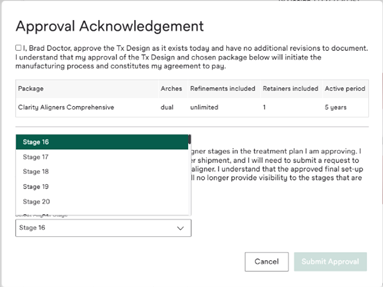
Can I both opt a Clarity Aligners case into partial shipment and approve with changes?
Yes.
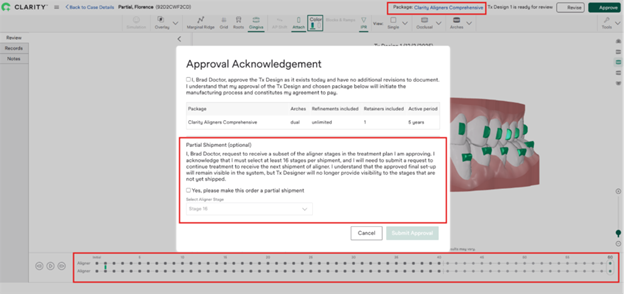
Can I opt a Clarity Aligners case into partial shipment on a refinement order?
Yes. If the refinement order is 25 or more stages, you will be prompted to opt the order into partial shipment.
Are my final set-up and staging preserved if I opt-in to partial shipment?
Yes, you will only see the shipped stages in the Tx Designer, but you can order more aligners off of your initially approved set-up and staging. When you are ready to order more aligners, you can elect to continue treatment, which does not require a new scan, or you can refine the case and modify the originally approved set-up and staging.
Can I select any increment of aligners to receive if I opt-in to partial shipment?
You may select to receive any subset of stages in the case greater than 16.
Is there a fee or upgrade charge associated with opting into partial shipment?
No.
Can I get an additional discount for opting into partial shipment?
No.
Can I tell if a case is opted into partial shipment from the case list?
If the most recent order on a case is subject to partial shipment, it will show in the case status column of the case list.
Can I tell if a case is opted into partial shipment from the Tx Designer?
If the most recent order on a case is subject to partial shipment, it will show in the staging bar at the bottom of the Tx Designer, as well as on the case list and case details page.
Can I place a reorder on a partial shipment case?
You can place a reorder on any stages of a partial shipment case that have been shipped.
When I’m selecting an aligner stage for my partial shipment, what does the “+” sign mean after certain stages?
The “+” sign after certain stages signifies that the stage is an overcorrection stage.
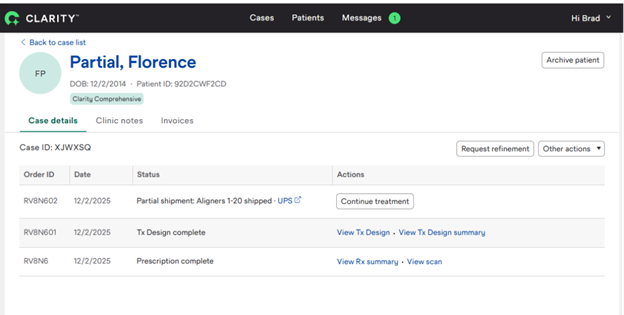
I approved a partial shipment order, but I don’t yet see the “Continue treatment” button on the case details page, why not?
The “Continue treatment” button will only appear once the order is no longer in process.
What actions do I need to take to get the next shipment of aligners on a partial shipment case?
When you are ready to order more aligners, you can elect to continue treatment from the case details page, or you can refine the case and modify the originally approved set-up and staging. Continuing treatment does not require a refinement scan; refining the case requires submission of a new patient scan.
What records do I need to submit with my refinement order to receive the next shipment of aligners on a partial shipment case?
It depends if you wish to order more aligners on the existing Tx Design and staging or if you wish to refine. If you elect to continue treatment on the existing Tx Design, you can do so from the “Continue treatment” button on the case details page without submitting additional records. If you choose to refine the case and modify the originally approved set-up and staging, a refinement scan is required.
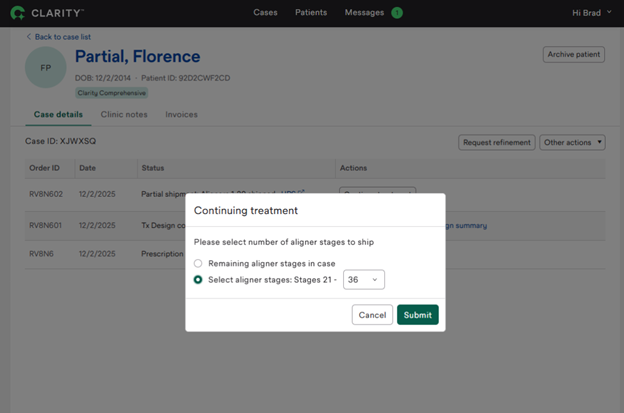
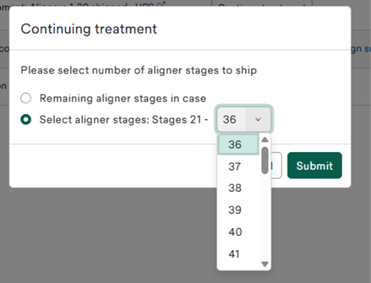
Can I order more aligner stages without providing new records if a case opted into partial shipment is tracking?
Yes. You may do so from the “Continue treatment” button on the case details page.
If I want to refine one arch of a dual-arch case and transition to retention on the opposing arch, will I be able to do that if I opt into partial shipment?
Yes. The functionality to refine an arch into retention will remain available if you opt a case into partial shipment.
To start working with the new features, go to Clarity Portal or request more information