




Solventum
Jul 6, 2026
/ Discover Clarity™ Portal’s latest updates for May
April 28, 2026
Discover the latest updates to our software for your digital orthodontic treatments.
We have exciting news! In our upcoming software release (May 9th), enhancements will be made to Clarity Portal and related products.
On May 9, Clarity Portal will transition to single sign‑on (SSO), creating a consistent, secure login experience across Solventum digital tools, including Clarity Portal (clarity.solventum.com). Single sign-on will provide enterprise-grade identity protection across select Solventum applications, leveraging a leading identity and access management solution.
With this update, email will become the only supported login identifier. Users signing in with an email address will be able to continue using their existing credentials. Access to the email address used as a credential is required to reset a forgotten password. If a user does not have access to their email address, they should contact Solventum clinician support.
Cloud-based single sign-on securely authenticates each user and connects them to the accounts and permissions they already have. Once signed in at clarity.solventum.com, users will land in Clarity Portal, with the same access, roles, and case information they had before. No workflows, tools, or clinical capabilities are being removed or redesigned as part of this release.
This transition lays the foundation for a more connected digital ecosystem. By standardizing authentication across applications, Clarity Portal can securely support future integrations — including streamlined navigation to a forthcoming bill pay and account management interface.
Users accessing Clarity Portal should ensure that they have clarity.solventum.com bookmarked to avoid access issues. URLs including auth.occ are not static and cannot be successfully bookmarked.
If you need help accessing your account, clinician support is available. Contact your local clinician support here:
To start working with Clarity™, go to Clarity Portal or request more information
Can I use a username other than my email address to log-in to Clarity Portal?
No. Email addresses are the only supported login identifier. Users who established a username that is not an email address will be able to access their account using the email address associated with their account and their existing password.
Some users use one email address to login, and a different email address for Clarity Portal communications. That is still supported. The email address used to log in will also be used for any access-related activities, such as password reset, and opted-in communications from Clarity Portal will continue to flow to the alternative email. In the event that one email is used for login and another is used for communications, the user should have access to both email accounts. To update one or both email addresses, please contact clinician support.
How can I reset my Solventum password?
If you previously established a password to Clarity Portal and have access to the email address associated with your account credentials, you can reset your password from the screen where you would typically enter your password in the sign-in process. If you do not have access to your email address, please contact Solventum clinician support. Please note, if your most recent login to Clarity Portal was prior to March 31, 2021, we were not able migrate your credentials to our single sign-on authenticator. Please contact Solventum clinician support to regain access to your Clarity Portal account.
Is multi-factor authentication required for Clarity Portal?
By default, multi-factor authentication is not required for Clarity Portal accounts. Individual users may establish multi-factor authentication by calling clinician support. Doctor users may call clinician support to request that multi-factor authentication be activated for all account users.
Why can’t I bookmark the log-in screen for Clarity Portal?
URLs including auth.occ are not static and cannot be bookmarked. Please ensure you bookmark clarity.solventum.com
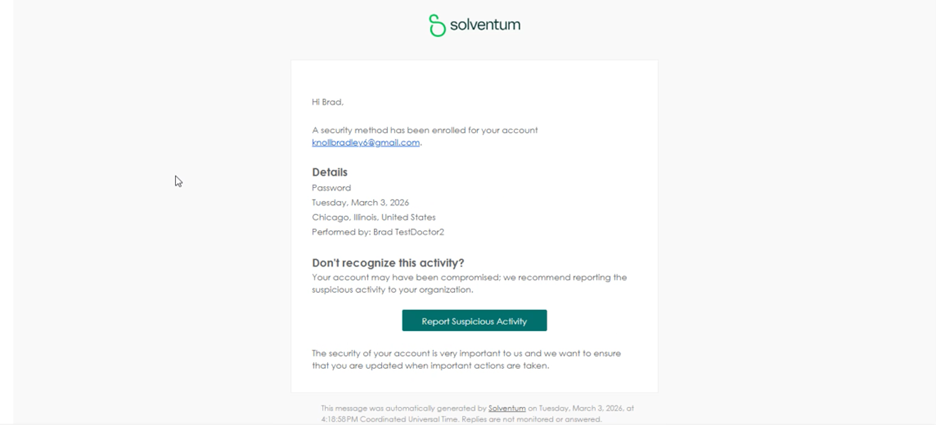
Why did I receive a notification that “a security method has been enrolled” for my account?
You may receive a notification that a security method has been enrolled in the event of a new log-in from an unknown IP address.
What are the password requirements for new accounts set-up with Solventum single sign-on?
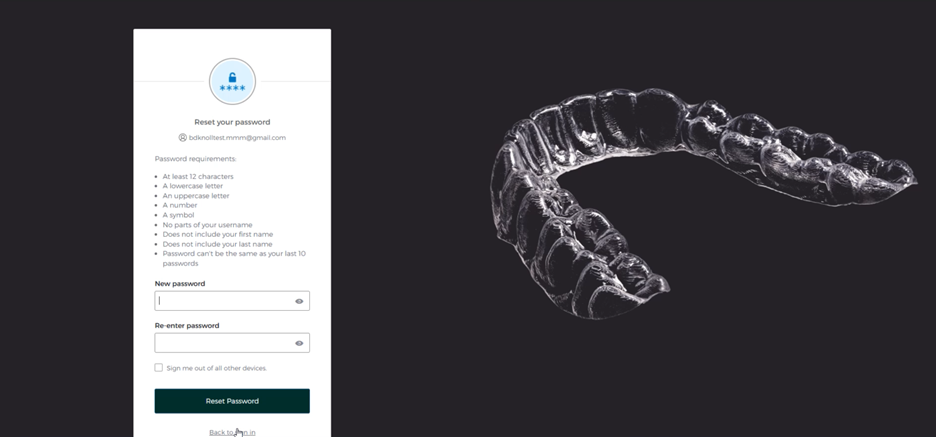
New accounts set-up should have passwords with at least 12 characters, an uppercase letter, a lowercase letter, a number, and a symbol. They may not contain parts of your username, your first name or last name, and they may not be the same as the previous 10 passwords used.
Why didn’t I receive an email from Solventum Identity when I set up my Clarity Portal account?
If you did not receive an email from Solventum Identity with your invitation to log in to Clarity Portal, your email address is likely already associated with a Solventum account. Try using your email and an existing Solventum password to access Clarity Portal. If you don’t remember a Solventum password, please attempt a password reset at clarity.solventum.com. If you receive an error message, please contact clinician support.
I was invited to Clarity Portal in the past. Why doesn’t it recognize me when I try to login?
If you were invited to join Clarity Portal but you never set up a password, we were unable to migrate your account to our single sign-on authenticator. Solventum clinician support can resend the Solventum Identity email, as well as the invitation to login to Clarity Portal. You will need to establish your Solventum credentials before you will be able to login to Clarity Portal.
I tried to log-in to Clarity Portal after May 9 and the password I usually use didn’t work – why not?
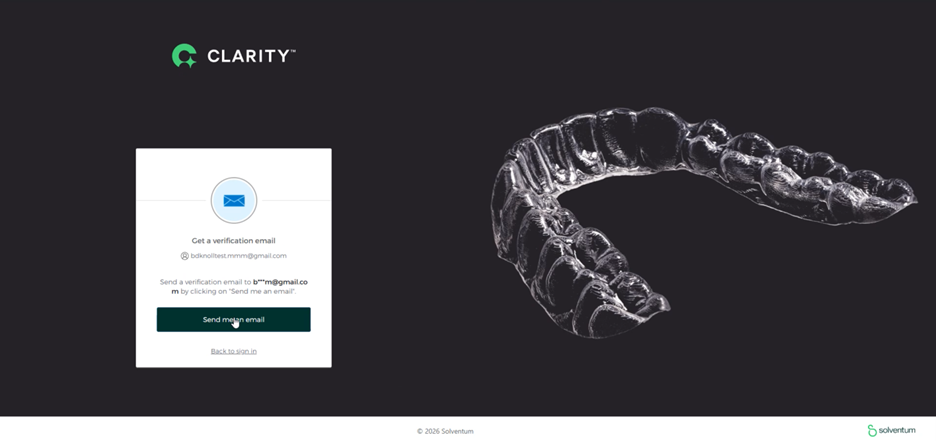
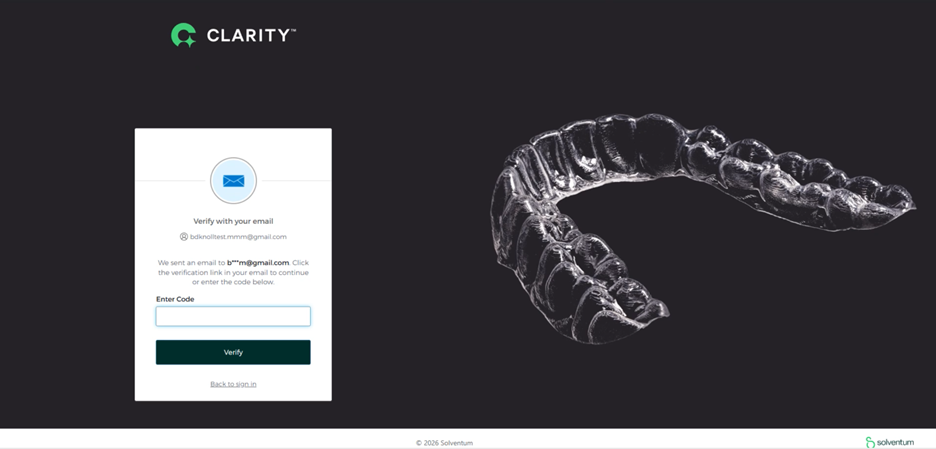
If your email is recognized but your password is invalid, please attempt to reset your account password. If you are unable to reset your password from clarity.solventum.com, please contact Solventum clinician support. Please note that if you request a link to reset your password, that link is only active for one hour.
Forgot password workflow:
I was just onboarded to Clarity Portal, but when I clicked on the link, the page said “user is not assigned to the client application – why?
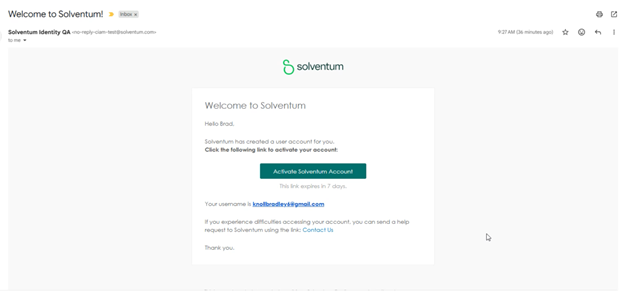
Prior to accessing Clarity Portal, you need to establish your Solventum credentials. Please locate an email from “Solventum Identity” and follow the steps to create your Solventum password. Once your Solventum password has been established, you can follow the link to Clarity Portal (clarity.solventum.com) and login. Please contact Solventum clinician support if you require additional support.
How many failed login attempts to Clarity Portal can I make before getting locked out?
Your Solventum account will lock after 10 failed attempts. Your account will lock for one hour. If you request a reset password link, the link needs to be used within an hour of your reset request.
I was onboarded to Clarity Portal and never set up a password or haven’t accessed my account for several years. I can’t gain access now – what should I do?
Please contact Solventum clinician support to set up your Solventum credentials. Our team will verify your identity and reactivate your account. If you don’t already have Solventum credentials, you will receive an email from Solventum Identity inviting you to set up a password. Once you have established your password, you will be able to login to Clarity Portal at clarity.solventum.com.
Please note, the Solventum Identity email, by default, will send to the email address that was previously associated with your Clarity Portal account. Clinician support can also support you by connecting a new email address to an existing Clarity Portal account.
To start working with Clarity™, go to Clarity Portal or request more information